Docker 101: containers, kernel and layers
If you’re in the software world, chances are you’ve used Docker. And if not, here’s a definition:
Docker is a platform for developing, packaging and running containers. Important word: containers, which are isolated environments that include everything your software needs to work. These containers are created from images, immutable and reusable templates defined through a Dockerfile. Thanks to this, the same image can be used in development, testing and production, becoming a consistent unit of work in a distributed world.
There are also other concepts that tend to be overlooked: volumes, which let you persist data, and networks, which connect containers to each other. All of this within an ecosystem like Docker Hub, which offers thousands of ready-to-use images.
I think knowing that, you could already start working and integrating containers into your workflow. But we don’t stop here, let’s go a little further.

Before the whales
Before Docker there were virtual machines (VMs), which are, in essence, a complete emulation of a physical computer inside another one. Each VM acts as an independent machine, with its own virtual CPU, RAM and storage, which lets you run operating systems and applications in an isolated and secure way.
We could ask ourselves: why not keep using virtual machines? But there’s an architectural drawback: the weight and volume of the box exceed those of its contents; that is, the system is wasting resources.
Each instance has to load and run a full operating system (Ubuntu, Debian, Windows or another), which takes a lot of resources. VM disk images usually take up gigabytes, and the boot process can take several minutes, even for simple applications. This creates overhead that affects both performance and system efficiency.
Using the kernel
Containers, unlike VMs, don’t emulate a complete computer or require a separate operating system. Instead, they share the host operating system’s kernel and isolate only the processes and resources needed to run an application. It’s operating-system-level virtualization. This removes much of the overhead, allowing more efficient use of resources and near-instant deployment.
A good way to picture it is to imagine a VM as a detached house: it has its own foundations, pillars, electrical system and plumbing. Containers, on the other hand, are like apartments in a modern building. Each apartment shares the main structure, the electrical system and the plumbing. And yet each apartment has everything it needs to live comfortably and independently.

Thanks to this we get Docker’s key values, particularly efficiency and resource optimization versus virtual machines:
- Portability: it works everywhere.
- Efficiency and resource optimization: lots of containers.
- Isolation and standardization: unit of work.
Namespaces and cgroups
Containers work on top of the kernel in an isolated way through two mechanisms: namespaces and cgroups.
A namespace abstracts global system resources so that processes believe they have their own isolated instance. Changes made to a resource are visible only to the processes that belong to the same namespace, remaining invisible to the rest.
Currently, the Linux kernel has 8 types:
| Namespace | Resource it isolates |
|---|---|
| cgroup | Root directory of control groups (cgroup). |
| IPC | Inter-process communication (System V IPC, POSIX message queues). |
| Network | Network devices, protocol stacks, ports, etc. |
| Mount | Filesystem mount points. |
| PID | Process IDs (lets a process be PID 1). |
| Time | Boot and monotonic clocks. |
| User | User and group IDs (lets you be root inside the namespace). |
| UTS | Hostname and NIS domain name. |
If namespaces decide what you can see, cgroups decide how much you can use.
Cgroups let you allocate system resources (CPU, memory, network bandwidth or a combination) among user-defined groups of tasks (processes). And they go further, letting you monitor the consumption of the configured groups, restrict access to certain resources or set limits. They even let us adjust limits and priorities dynamically. With these mechanisms we achieve isolation.
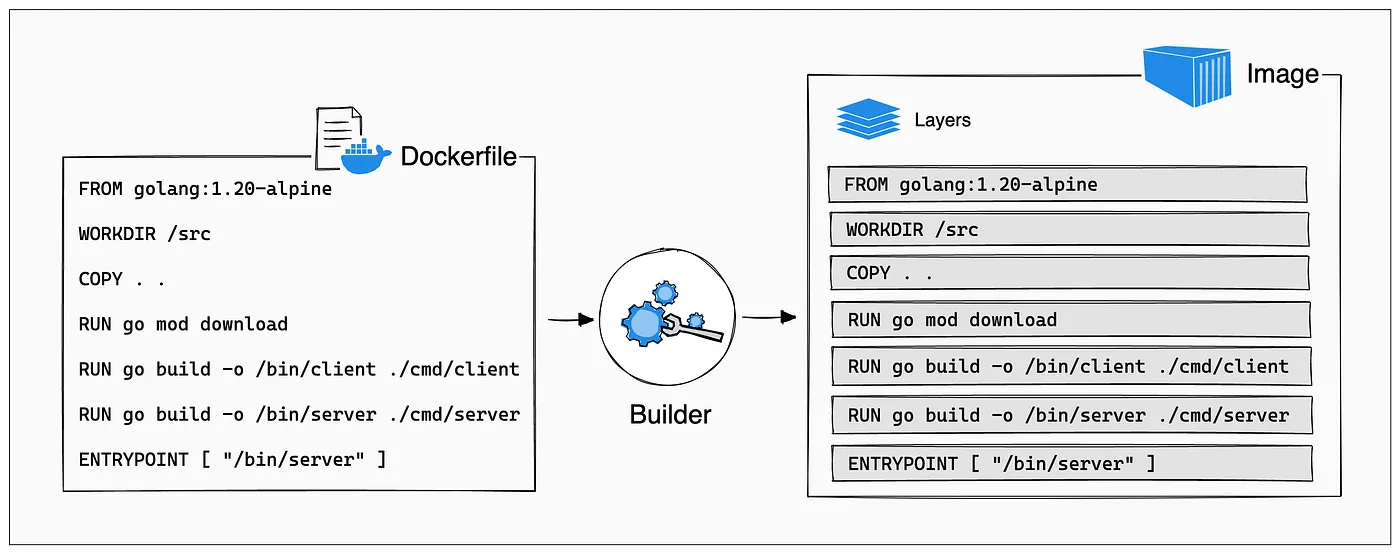
Docker operates on immutable layers
An immutable layer is a set of read-only files that records a specific state change in the image. Since they can’t be altered, Docker reuses them across multiple containers without duplicating disk space, guaranteeing that the environment is always identical and predictable (determinism). Any later modification doesn’t edit the base layer, but generates a new one on top of it, protecting the integrity of the original source.
Working across layers is possible thanks to the concept of UnionFS. This engine takes folders in different layers and “merges” them virtually so they look like a traditional filesystem. This way we get immutable layers working in harmony, making it possible to spin up disposable infrastructure that is completely replicable.
Communication and networking
The network namespace is what isolates the network. Each container operates as if it had its own network card and its own IP. Based on this, to connect containers we need a “switch”, a bridge that allows interaction, as if it were a physical network, creating virtual cabling through a subnet.
But there’s a problem: IPs are ephemeral and, so we don’t have to configure IPs all the time, the internal DNS server steps in, intercepting the request and returning the current IP, or rather the service name. These 3 mechanisms let us keep communication fast, secure and reliable.
Docker and its friends
However, Docker is just the unit of work. In modern professional applications (like those using Django or FastAPI), we rarely work with a single container; we usually need a database, a backend, a worker and a frontend working together. This is where Docker Compose comes in as the orchestra conductor. With a single configuration file, you can define a complete infrastructure for a digital product.
Other technologies like Kubernetes or Docker Swarm let us orchestrate at a larger scale.
With that, I think that’s enough whales for one day, maybe for a week, maybe for a good while. I hope it taught you something, and remember that all of these technologies draw heavily from others like operating systems, virtualization and networking… and remember: if you’re out there working with Docker, don’t forget to create your .dockerignore.

Note:
Docker Compose is great for development and testing, but in production you shouldn’t put the database in a container. A database needs real persistence, high availability and good performance tuning. For production, it’s safer to use managed services (AWS RDS, Cloud SQL) or dedicated VMs with backups, replicas and serious monitoring.
Resources
#docker #containers #virtualization
Let's stay in touch: learn more about me or chat on Twitter / X · Instagram .